
Javassm - item1-15 (用户下单 + 订单支付 2)
内容
- 导入地址簿功能代码
- 用户下单
- 订单支付
订单支付
微信支付介绍
前面的课程已经实现了用户下单,那接下来就是订单支付,就是完成付款功能。支付大家应该都不陌生了,在现实生活中经常购买商品并且使用支付功能来付款,在付款的时候可能使用比较多的就是微信支付和支付宝支付了。在苍穹外卖项目中,选择的就是微信支付这种支付方式。
要实现微信支付就需要注册微信支付的一个商户号,这个商户号是必须要有一家企业并且有正规的营业执照。只有具备了这些资质之后,才可以去注册商户号,才能开通支付权限。
个人不具备这种资质,所以我们在学习微信支付时,最重要的是了解微信支付的流程,并且能够阅读微信官方提供的接口文档,能够和第三方支付平台对接起来就可以了。
本项目选择小程序支付
参考:https://pay.weixin.qq.com/static/product/product_index.shtml
微信小程序支付时序图
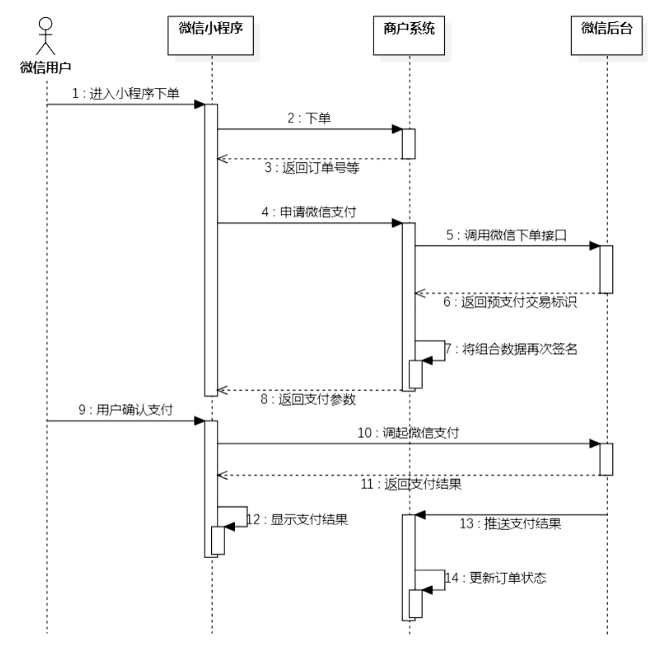
用户首先去小程序下单,然后商户系统(后端)会设置订单号什么返回前端,之后用户准备支付时,向后端发起申请,然后后端去调用 微信下单接口 (JSAPI下单) 微信支付服务后台生成预支付交易单(对应时序图的第5步)
之后将对应参数返回给前端,然后用户基于此可以进行支付,从而在前端调用了小程序支付(对应时序图的第10步),最后返回支付结果在前端。
同时,后端收到来自微信后台的推送,从而进一步更新对应订单的状态
微信相关接口
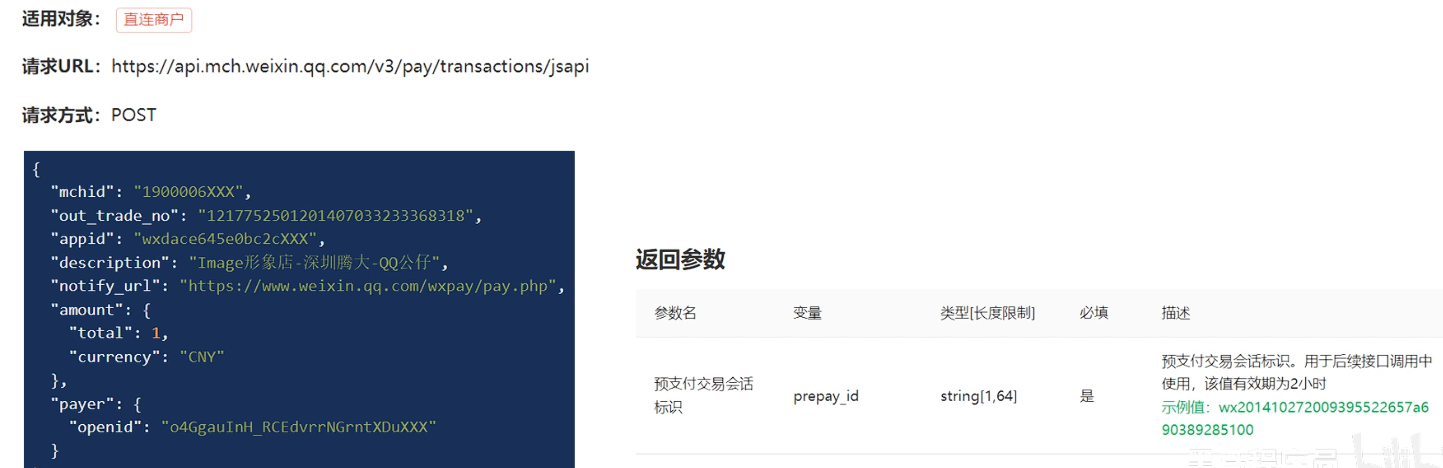
JSAPI下单
商户系统调用该接口在微信支付服务后台生成预支付交易单(对应时序图的第5步)
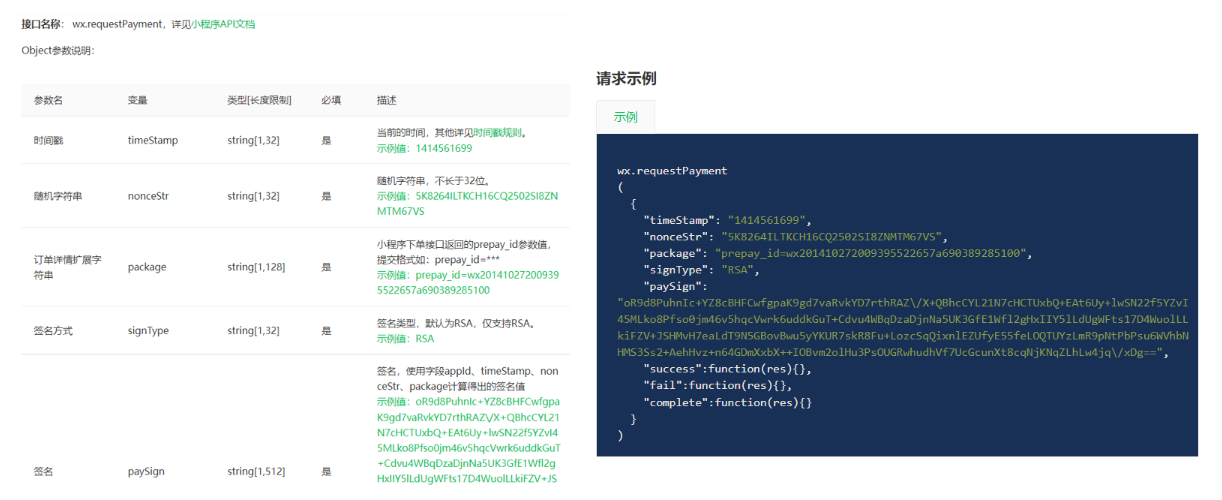
微信小程序调起支付 (前端用的)
通过JSAPI下单接口获取到发起支付的必要参数prepay_id,然后使用微信支付提供的小程序方法调起小程序支付(对应时序图的第10步)
微信支付准备工作
证书设置
完成微信支付有两个关键的步骤:
第一个就是需要在商户系统当中调用微信后台的一个下单接口,就是生成预支付交易单。
第二个就是支付成功之后微信后台会给推送消息。
这两个接口数据的安全性,要求其实是非常高的。
**解决:**微信提供的方式就是对数据进行加密、解密、签名多种方式。要完成数据加密解密,需要提前准备相应的一些文件,其实就是一些证书。
需要两个证书: 微信支付平台证书、商户私钥文件
域名设置
微信后台会调用到商户系统给推送支付的结果,在这里我们就会遇到一个问题,就是微信后台怎么就能调用到我们这个商户系统呢?因为这个调用过程,其实本质上也是一个HTTP请求。
目前,商户系统它的ip地址就是当前自己电脑的ip地址,只是一个局域网内的ip地址,微信后台无法调用到。
解决:内网穿透。通过cpolar软件可以获得一个临时域名,而这个临时域名是一个公网ip,这样,微信后台就可以请求到商户系统了
代码导入
微信支付相关配置
application-dev.yml
sky:
  wechat:
    appid: wxcd2e39f677fd30ba
    secret: 84fbfdf5ea288f0c432d829599083637
    mchid : 1561414331
    mchSerialNo: 4B3B3DC35414AD50B1B755BAF8DE9CC7CF407606
    privateKeyFilePath: D:\apiclient_key.pem
    apiV3Key: CZBK51236435wxpay435434323FFDuv3
    weChatPayCertFilePath: D:\wechatpay_166D96F876F45C7D07CE98952A96EC980368ACFC.pem
    notifyUrl: https://www.weixin.qq.com/wxpay/pay.php
    refundNotifyUrl: https://www.weixin.qq.com/wxpay/pay.php
application.yml
sky:
  wechat:
    appid: ${sky.wechat.appid}
    secret: ${sky.wechat.secret}
    mchid : ${sky.wechat.mchid}
    mchSerialNo: ${sky.wechat.mchSerialNo}
    privateKeyFilePath: ${sky.wechat.privateKeyFilePath}
    apiV3Key: ${sky.wechat.apiV3Key}
    weChatPayCertFilePath: ${sky.wechat.weChatPayCertFilePath}
    notifyUrl: ${sky.wechat.notifyUrl}
    refundNotifyUrl: ${sky.wechat.refundNotifyUrl}
WeChatProperties.java:读取配置
package com.sky.properties;

import lombok.Data;
import org.springframework.beans.factory.annotation.Value;
import org.springframework.boot.context.properties.ConfigurationProperties;
import org.springframework.stereotype.Component;

@Component
@ConfigurationProperties(prefix = "sky.wechat")
@Data
public class WeChatProperties {
    private String appid; //小程序的appid
    private String secret; //小程序的秘钥
    private String mchid; //商户号
    private String mchSerialNo; //商户API证书的证书序列号
    private String privateKeyFilePath; //商户私钥文件
    private String apiV3Key; //证书解密的密钥
    private String weChatPayCertFilePath; //平台证书
    private String notifyUrl; //支付成功的回调地址
    private String refundNotifyUrl; //退款成功的回调地址
}
1. 实现后端预下单功能 (payment JSAPI下单)
Controller层
在OrderController.java中添加payment方法
/**
* 订单支付
*
* @param ordersPaymentDTO
* @return
*/
@PutMapping("/payment")
@ApiOperation("订单支付")
public Result<OrderPaymentVO> payment(@RequestBody OrdersPaymentDTO ordersPaymentDTO) throws Exception {
    log.info("订单支付:{}", ordersPaymentDTO);
    OrderPaymentVO orderPaymentVO = orderService.payment(ordersPaymentDTO);
    log.info("生成预支付交易单:{}", orderPaymentVO);
    return Result.success(orderPaymentVO);
}
Service层
在OrderService.java中添加payment方法定义
/**
 * 订单支付
 * @param ordersPaymentDTO
 * @return
 */
OrderPaymentVO payment(OrdersPaymentDTO ordersPaymentDTO) throws Exception;
在OrderServiceImpl.java中实现payment方法
@Autowired
private UserMapper userMapper;
@Autowired
private WeChatPayUtil weChatPayUtil;
/**
 * 订单支付
 *
 * @param ordersPaymentDTO
 * @return
 */
public OrderPaymentVO payment(OrdersPaymentDTO ordersPaymentDTO) throws Exception {
  // 当前登录用户id
  Long userId = BaseContext.getCurrentId();
  User user = userMapper.getById(userId);

  //调用微信支付接口,生成预支付交易单
  JSONObject jsonObject = weChatPayUtil.pay(
          ordersPaymentDTO.getOrderNumber(), //商户订单号
          new BigDecimal(0.01), //支付金额,单位 元
          "苍穹外卖订单", //商品描述
          user.getOpenid() //微信用户的openid
  );

  if (jsonObject.getString("code") != null && jsonObject.getString("code").equals("ORDERPAID")) {
      throw new OrderBusinessException("该订单已支付");
  }

  OrderPaymentVO vo = jsonObject.toJavaObject(OrderPaymentVO.class);
  vo.setPackageStr(jsonObject.getString("package"));

  return vo;
}
2. 实现支付成功后操作 (paySuccess)
Controller层
PayNotifyController.java
/**
 * 支付回调相关接口
 */
@RestController
@RequestMapping("/notify")
@Slf4j
public class PayNotifyController {
  @Autowired
  private OrderService orderService;
  @Autowired
  private WeChatProperties weChatProperties;

  /**
   * 支付成功回调
   *
   * @param request
   */
  @RequestMapping("/paySuccess")
  public void paySuccessNotify(HttpServletRequest request, HttpServletResponse response) throws Exception {
      //读取数据
      String body = readData(request);
      log.info("支付成功回调:{}", body);

      //数据解密
      String plainText = decryptData(body);
      log.info("解密后的文本:{}", plainText);

      JSONObject jsonObject = JSON.parseObject(plainText);
      String outTradeNo = jsonObject.getString("out_trade_no");//商户平台订单号
      String transactionId = jsonObject.getString("transaction_id");//微信支付交易号

      log.info("商户平台订单号:{}", outTradeNo);
      log.info("微信支付交易号:{}", transactionId);

      //业务处理,修改订单状态、来单提醒
      orderService.paySuccess(outTradeNo);

      //给微信响应
      responseToWeixin(response);
  }

  /**
   * 读取数据
   *
   * @param request
   * @return
   * @throws Exception
   */
  private String readData(HttpServletRequest request) throws Exception {
      BufferedReader reader = request.getReader();
      StringBuilder result = new StringBuilder();
      String line = null;
      while ((line = reader.readLine()) != null) {
          if (result.length() > 0) {
              result.append("\n");
          }
          result.append(line);
      }
      return result.toString();
  }

  /**
   * 数据解密
   *
   * @param body
   * @return
   * @throws Exception
   */
  private String decryptData(String body) throws Exception {
      JSONObject resultObject = JSON.parseObject(body);
      JSONObject resource = resultObject.getJSONObject("resource");
      String ciphertext = resource.getString("ciphertext");
      String nonce = resource.getString("nonce");
      String associatedData = resource.getString("associated_data");

      AesUtil aesUtil = new AesUtil(weChatProperties.getApiV3Key().getBytes(StandardCharsets.UTF_8));
      //密文解密
      String plainText = aesUtil.decryptToString(associatedData.getBytes(StandardCharsets.UTF_8),
              nonce.getBytes(StandardCharsets.UTF_8),
              ciphertext);

      return plainText;
  }

  /**
   * 给微信响应
   * @param response
   */
  private void responseToWeixin(HttpServletResponse response) throws Exception{
      response.setStatus(200);
      HashMap<Object, Object> map = new HashMap<>();
      map.put("code", "SUCCESS");
      map.put("message", "SUCCESS");
      response.setHeader("Content-type", ContentType.APPLICATION_JSON.toString());
      response.getOutputStream().write(JSONUtils.toJSONString(map).getBytes(StandardCharsets.UTF_8));
      response.flushBuffer();
  }
}
Service层
在OrderService.java中添加paySuccess方法定义
/**
 * 支付成功,修改订单状态
 * @param outTradeNo
 */
void paySuccess(String outTradeNo);
在OrderServiceImpl.java中实现paySuccess方法
/**
 * 支付成功,修改订单状态
 *
 * @param outTradeNo
 */
public void paySuccess(String outTradeNo) {
  // 当前登录用户id
  Long userId = BaseContext.getCurrentId();

  // 根据订单号查询当前用户的订单
  Orders ordersDB = orderMapper.getByNumberAndUserId(outTradeNo, userId);

  // 根据订单id更新订单的状态、支付方式、支付状态、结账时间
  Orders orders = Orders.builder()
          .id(ordersDB.getId())
          .status(Orders.TO_BE_CONFIRMED)
          .payStatus(Orders.PAID)
          .checkoutTime(LocalDateTime.now())
          .build();

  orderMapper.update(orders);
}
Mapper层
在OrderMapper.java中添加getByNumberAndUserId和update两个方法
/**
 * 根据订单号和用户id查询订单
 * @param orderNumber
 * @param userId
 */
@Select("select * from orders where number = #{orderNumber} and user_id= #{userId}")
Orders getByNumberAndUserId(String orderNumber, Long userId);

/**
 * 修改订单信息
 * @param orders
 */
void update(Orders orders);
在OrderMapper.xml中添加
<update id="update" parameterType="com.sky.entity.Orders">
  update orders
  <set>
      <if test="cancelReason != null and cancelReason!='' ">
          cancel_reason=#{cancelReason},
      </if>
      <if test="rejectionReason != null and rejectionReason!='' ">
          rejection_reason=#{rejectionReason},
      </if>
      <if test="cancelTime != null">
          cancel_time=#{cancelTime},
      </if>
      <if test="payStatus != null">
          pay_status=#{payStatus},
      </if>
      <if test="payMethod != null">
          pay_method=#{payMethod},
      </if>
      <if test="checkoutTime != null">
          checkout_time=#{checkoutTime},
      </if>
      <if test="status != null">
          status = #{status},
      </if>
      <if test="deliveryTime != null">
          delivery_time = #{deliveryTime}
      </if>
  </set>
  where id = #{id}
</update>