
Javassm - item1-19 (营业额|用户|订单统计2)
约 1411 字大约 5 分钟
内容
- Apache ECharts
- 营业额统计
- 用户统计
- 订单统计
- 销量排名Top10
功能实现:数据统计
订单统计
订单统计通过一个折现图来展现,折线图上有两根线,这根蓝色的线代表的是订单总数,而下边这根绿色的线代表的是有效订单数,指的就是状态是已完成的订单就属于有效订单,分别反映的是每一天的数据。
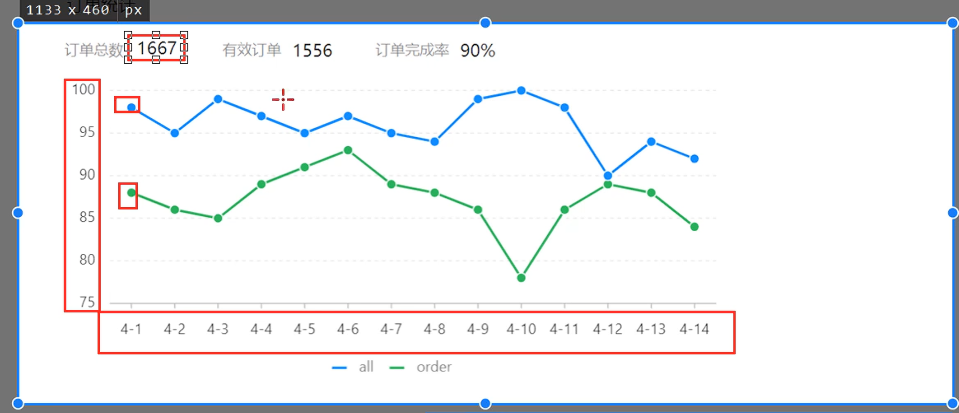
上面还有3个数字,分别是订单总数、有效订单、订单完成率,它指的是整个时间区间之内总的数据。
分析
业务规则
- 有效订单指状态为 “已完成” 的订单
- 基于可视化报表的折线图展示订单数据,X轴为日期,Y轴为订单数量
- 根据时间选择区间,展示每天的订单总数和有效订单数
- 展示所选时间区间内的有效订单数、总订单数、订单完成率,订单完成率 = 有效订单数 / 总订单数 * 100%
接口设计
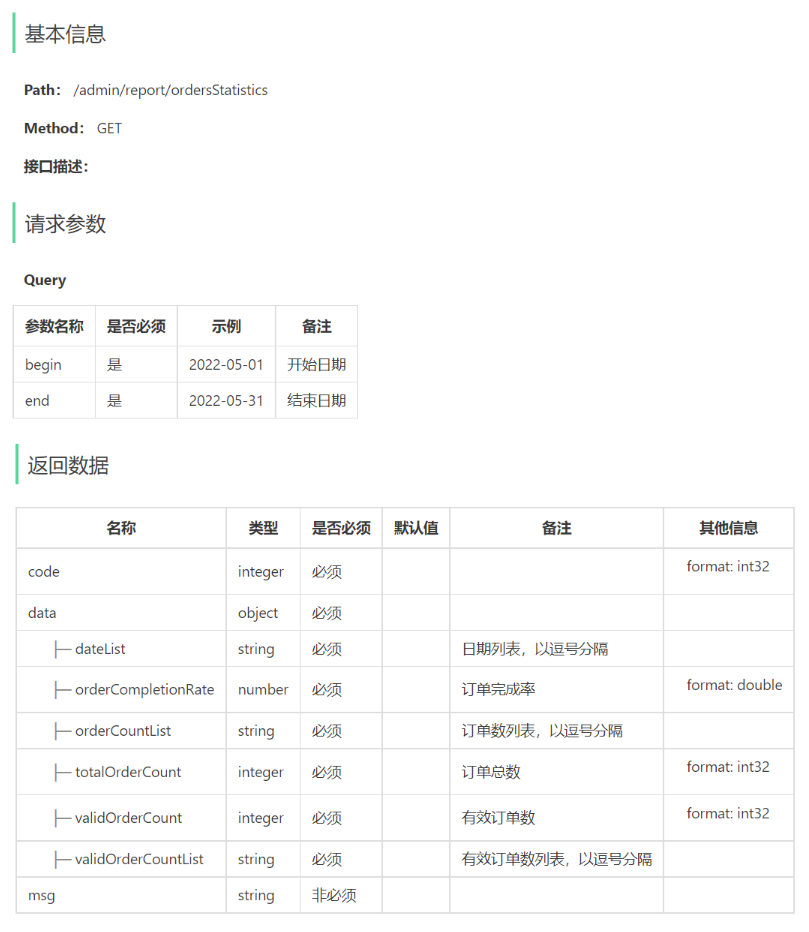
代码开发
VO设计
在sky-pojo模块,OrderReportVO.java已定义
@Data
@Builder
@NoArgsConstructor
@AllArgsConstructor
public class OrderReportVO implements Serializable {

    //日期,以逗号分隔,例如:2022-10-01,2022-10-02,2022-10-03
    private String dateList;

    //每日订单数,以逗号分隔,例如:260,210,215
    private String orderCountList;

    //每日有效订单数,以逗号分隔,例如:20,21,10
    private String validOrderCountList;

    //订单总数
    private Integer totalOrderCount;

    //有效订单数
    private Integer validOrderCount;

    //订单完成率
    private Double orderCompletionRate;

}
Controller层
在ReportController中根据订单统计接口创建orderStatistics方法
/**
 * 订单数据统计
 * @param begin
 * @param end
 * @return
 */
@GetMapping("/ordersStatistics")
@ApiOperation("用户数据统计")
public Result<OrderReportVO> orderStatistics(
        @DateTimeFormat(pattern = "yyyy-MM-dd")
                LocalDate begin,
        @DateTimeFormat(pattern = "yyyy-MM-dd")
                LocalDate end){

    return Result.success(reportService.getOrderStatistics(begin,end));
}
Service层
接口
在ReportService接口中声明getOrderStatistics方法:
/**
* 根据时间区间统计订单数量
* @param begin
* @param end
* @return
*/
OrderReportVO getOrderStatistics(LocalDate begin, LocalDate end);
实现类
/**
 * 根据时间区间统计订单数量
 * @param begin
 * @param end
 * @return
 */
@Override
public OrderReportVO getOrderStatistics(LocalDate begin, LocalDate end){
    List<LocalDate> dateList = new ArrayList<>();
    dateList.add(begin);

    while (!begin.equals(end)){
        begin = begin.plusDays(1);
        dateList.add(begin);
    }
    //每天订单总数集合
    List<Integer> orderCountList = new ArrayList<>();
    //每天有效订单数集合
    List<Integer> validOrderCountList = new ArrayList<>();
    for (LocalDate date : dateList) {
        LocalDateTime beginTime = LocalDateTime.of(date, LocalTime.MIN);
        LocalDateTime endTime = LocalDateTime.of(date, LocalTime.MAX);
        //查询每天的总订单数 select count(id) from orders where order_time > ? and order_time < ?
        Integer orderCount = getOrderCount(beginTime, endTime, null);

        //查询每天的有效订单数 select count(id) from orders where order_time > ? and order_time < ? and status = ?
        Integer validOrderCount = getOrderCount(beginTime, endTime, Orders.COMPLETED);

        orderCountList.add(orderCount);
        validOrderCountList.add(validOrderCount);
    }

    //时间区间内的总订单数
    Integer totalOrderCount = orderCountList.stream().reduce(Integer::sum).get();
    //时间区间内的总有效订单数
    Integer validOrderCount = validOrderCountList.stream().reduce(Integer::sum).get();
    //订单完成率
    Double orderCompletionRate = 0.0;
    if(totalOrderCount != 0){
        orderCompletionRate = validOrderCount.doubleValue() / totalOrderCount;
    }
    return OrderReportVO.builder()
            .dateList(StringUtils.join(dateList, ","))
            .orderCountList(StringUtils.join(orderCountList, ","))
            .validOrderCountList(StringUtils.join(validOrderCountList, ","))
            .totalOrderCount(totalOrderCount)
            .validOrderCount(validOrderCount)
            .orderCompletionRate(orderCompletionRate)
            .build();

}

/**
 * 根据时间区间统计指定状态的订单数量
 * @param beginTime
 * @param endTime
 * @param status
 * @return
 */
private Integer getOrderCount(LocalDateTime beginTime, LocalDateTime endTime, Integer status) {
    Map map = new HashMap();
    map.put("status", status);
    map.put("begin",beginTime);
    map.put("end", endTime);
    return orderMapper.countByMap(map);
}
Mapper层
在OrderMapper接口中声明countByMap方法
/**
*根据动态条件统计订单数量
* @param map
*/
Integer countByMap(Map map);
在OrderMapper.xml文件中编写动态SQL
<select id="countByMap" resultType="java.lang.Integer">
select count(id) from orders
<where>
<if test="status != null">
and status = #{status}
</if>
<if test="begin != null">
and order_time >= #{begin}
</if>
<if test="end != null">
and order_time <= #{end}
</if>
</where>
</select>
销量排名统计
所谓销量排名,销量指的是商品销售的数量。项目当中的商品主要包含两类:一个是套餐,一个是菜品,所以销量排名其实指的就是菜品和套餐销售的数量排名。
通过柱形图来展示销量排名,这些销量是按照降序来排列,并且只需要统计销量排名前十的商品
分析
业务规则
- 根据时间选择区间,展示销量前10的商品(包括菜品和套餐)
- 基于可视化报表的柱状图降序展示商品销量
- 此处的销量为商品销售的份数
接口设计
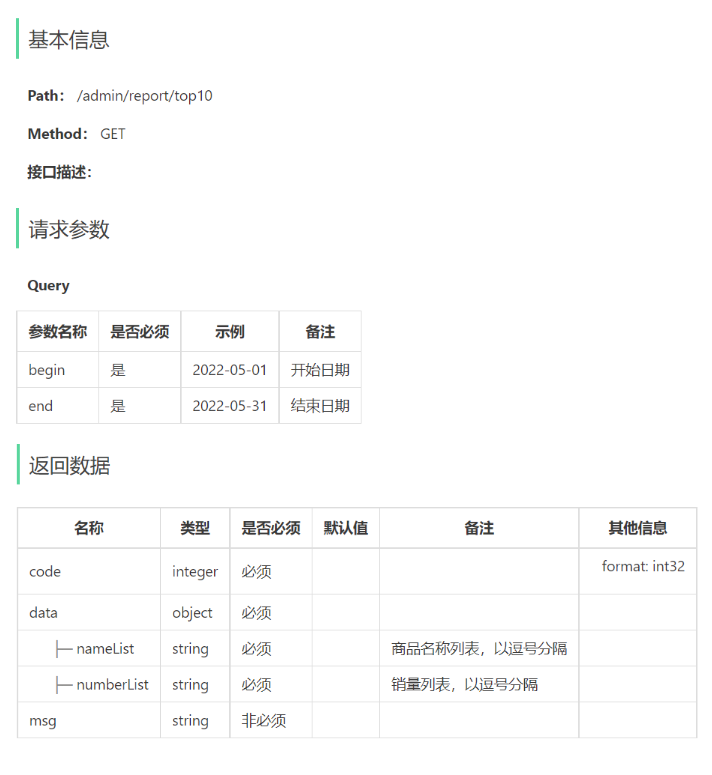
代码开发
VO设计
@Data
@Builder
@NoArgsConstructor
@AllArgsConstructor
public class SalesTop10ReportVO implements Serializable {

    //商品名称列表,以逗号分隔,例如:鱼香肉丝,宫保鸡丁,水煮鱼
    private String nameList;

    //销量列表,以逗号分隔,例如:260,215,200
    private String numberList;

}
Controller层
在ReportController中根据销量排名接口创建top10方法
/**
* 销量排名统计
* @param begin
* @param end
* @return
*/
@GetMapping("/top10")
@ApiOperation("销量排名统计")
public Result<SalesTop10ReportVO> top10(
    @DateTimeFormat(pattern = "yyyy-MM-dd") LocalDate begin,
    @DateTimeFormat(pattern = "yyyy-MM-dd") LocalDate end){
  return Result.success(reportService.getSalesTop10(begin,end));
}
Service层
接口
在ReportService接口中声明getSalesTop10方法
/**
* 查询指定时间区间内的销量排名top10
* @param begin
* @param end
* @return
*/
SalesTop10ReportVO getSalesTop10(LocalDate begin, LocalDate end);
实现类
在ReportServiceImpl实现类中实现getSalesTop10方法
/**
 * 查询指定时间区间内的销量排名top10
 * @param begin
 * @param end
 * @return
 * */
public SalesTop10ReportVO getSalesTop10(LocalDate begin, LocalDate end){
  LocalDateTime beginTime = LocalDateTime.of(begin, LocalTime.MIN);
  LocalDateTime endTime = LocalDateTime.of(end, LocalTime.MAX);
  List<GoodsSalesDTO> goodsSalesDTOList = orderMapper.getSalesTop10(beginTime, endTime);

  String nameList = StringUtils.join(goodsSalesDTOList.stream().map(GoodsSalesDTO::getName).collect(Collectors.toList()),",");
  String numberList = StringUtils.join(goodsSalesDTOList.stream().map(GoodsSalesDTO::getNumber).collect(Collectors.toList()),",");

  return SalesTop10ReportVO.builder()
          .nameList(nameList)
          .numberList(numberList)
          .build();
}
Mapper层
在OrderMapper接口中声明getSalesTop10方法:
/**
* 查询商品销量排名
* @param begin
* @param end
*/
List<GoodsSalesDTO> getSalesTop10(LocalDateTime begin, LocalDateTime end);
在OrderMapper.xml文件中编写动态SQL:
<select id="getSalesTop10" resultType="com.sky.dto.GoodsSalesDTO">
select od.name name,sum(od.number) number from order_detail od ,orders o
where od.order_id = o.id
and o.status = 5
<if test="begin != null">
and order_time >= #{begin}
</if>
<if test="end != null">
and order_time <= #{end}
</if>
group by name
order by number desc
limit 0, 10
</select>